

If you are like I once was, here is what my “structured” training used to look like: I would register for a race, figure out how much time I had until then, and then basically try to get in a few particular runs or workouts per week, up until the race day. The problem with that was it wasn;t really structured and it wasn’t really doing much for increasing my performance. But then, one strange morning I discovered Training Peaks.
If you’re following a structured plan, TrainingPeaks is seriously worth a look. Not sponsored, they don’t know I exist, as far as I know. It’s simply a clean way to organize training, send workouts to your watch or bike computer, and see how the work adds up over weeks and months. If you have a coach, they can even track your progress “live” (kinda) and let you know if you are over or under training. It is really a fantastic way to up the game when it comes to your training.
But, let’s say you already knew that, and you got a plan added in your TrainingPeaks calendar. Now what?
The dashboard can feel busy at first (for real!), so here’s a plain‑English way to use (or understand) the three big TP dials: Fitness, Fatigue, and Form.
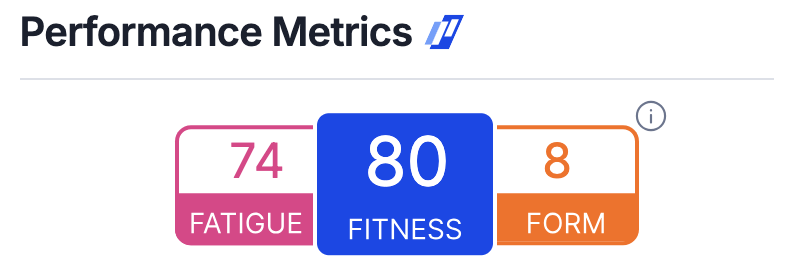
Fitness, which TrainingPeaks labels as CTL, is the long view of your training load. Imagine it as your durability score, built gradually from the work you’ve done in recent weeks. When Fitness rises steadily, you’re usually becoming more resilient and able to handle more training. It isn’t a promise that you’ll be sharp on any given day; it’s more like an account balance that grows when you pay in regularly. If Fitness flatlines for a long stretch while you’re healthy and consistent, you may not be building enough volume or variety. If it rockets up while you feel run‑down, you’re probably adding load faster than your body can absorb. This will usually also be visible by reading a bit into Fatigue and Form.
Fatigue, or ATL, is the short view. It tells you how much stress you’re carrying from the last several days. After a couple of tough sessions, Fatigue should climb. A few easy days and good sleep will bring it down again. High Fatigue by itself is not bad; it’s the cost of doing meaningful work. You don’t want to be in the red for prolonged periods of time.
Form, or TSB, is today’s freshness. It’s simply Fitness minus Fatigue. When Form is near zero or slightly positive, most people feel ready to perform. When it’s negative, you’re training with some tiredness in the system, which is perfectly normal in the middle of a build.
They are not medical diagnostics, nor are they guarantees. You can show a good Fitness number and still have a lousy run if you under‑fuel, sleep badly, or cook yourself in the heat. They don’t know about your cranky knee or a nightmare week at work. They’re a training‑load proxy, helpful for steering. I view it as one more data set that I can use to help steer my training a little bit. And they are not a leaderboard. Chasing bigger values for their own sake usually leads to “always kind of tired” training and a plateau. Also avoid comparing stats with your friends at all costm, trust me 🙂
Essentially, you may want to let the numbers confirm the shape, not dictate it. Over a month, you want Fitness to trend upward with small step‑downs during recovery weeks. Let Fatigue rise after quality and long days, then also let it come down with easy days or recovery weeks. Aim to schedule breakthrough workouts and tune‑up races when Form is closer to neutral or slightly positive so you’re fresh enough to hit your targets. For a big A‑race, most athletes perform best when they’ve tapered to mild positive Form; for shorter efforts you can race well with a touch of residual fatigue. On ordinary training weeks, a mildly negative Form is fine, it simply means you’re doing work.
I repeat: Don’t chase someone else’s numbers. Anchor your targets to your own history.
Used this way, TrainingPeaks becomes a nice additional tool you can use on your journey to improvement.
However, ignoring those fun statistics, for me the biggest value add with TrainingPeaks is simply how easy it is to follow structured plans. Sync it up to the calendar, and it will automatically sync to your Garmin etc You get in the pool, press the Swim, and that day’s workout is sitting right there. Bike training? No problem, the workout will sit ready on your bike computer as well, and even sit ready in Zwift if that’s your thing.
Absolutely fantastic.






Leave a Reply